Why AI Gets Frontend Wrong (And Why That's Your Superpower)
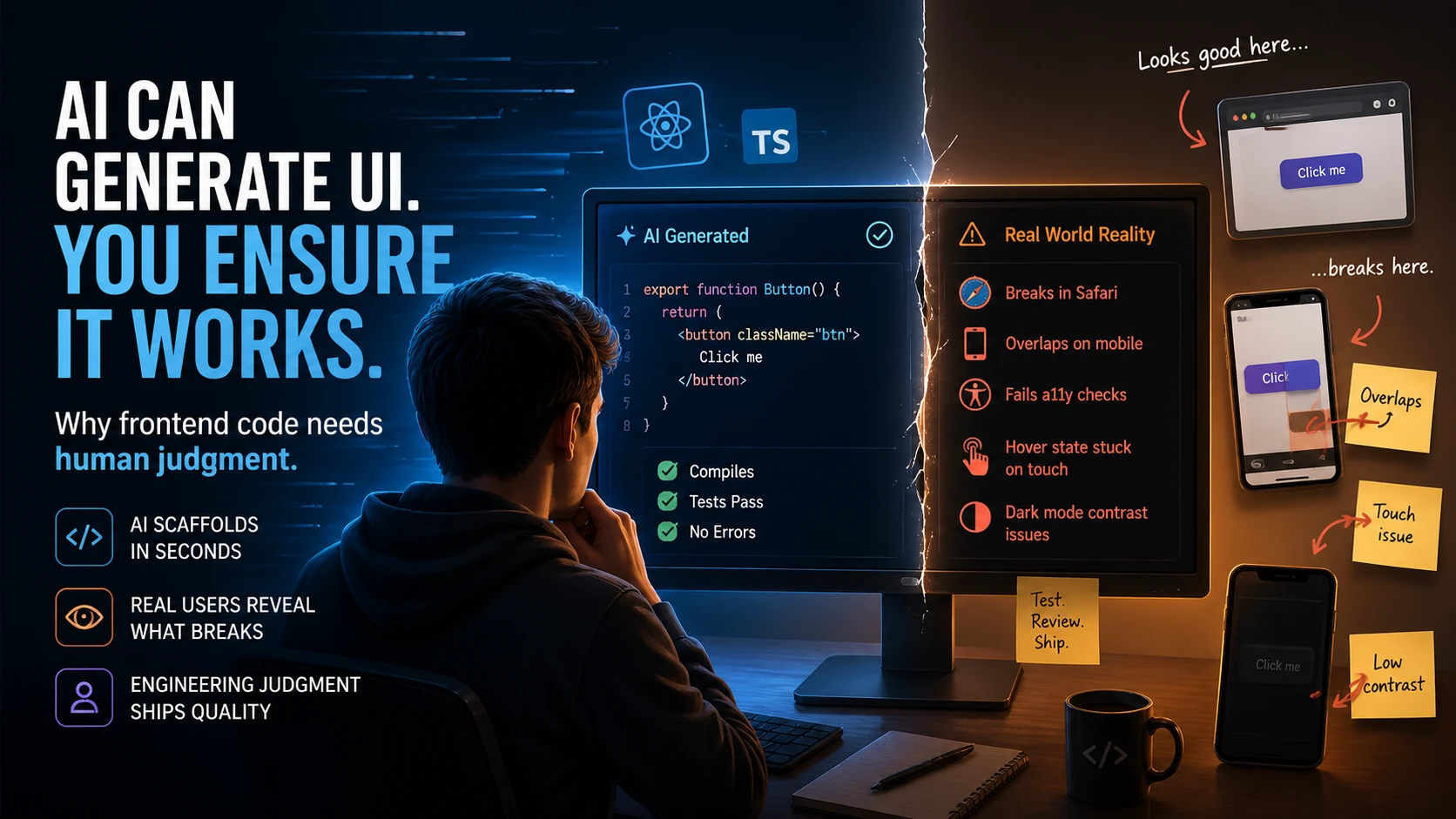
AI can scaffold a React component in 3 seconds. It can also generate CSS that breaks in Safari, HTML that fails accessibility checks, and layouts that collapse on mobile. The gap is not a bug. It is a fundamental limit of how LLMs work.
Most developers using AI code generation tools assume that if the code compiles and the tests pass, the job is done. For backend logic, that assumption often holds. For frontend code, it is dangerously wrong. A new article circulating on Hacker News (nerdy.dev, 727 views) details the exact reasons why AI excels at scaffolding UI code but fails catastrophically when that code meets real users. Understanding this gap is not just academic. It is where your engineering judgment becomes genuinely irreplaceable.
AI cannot see. The developers who will thrive in the AI era are the ones who understand this limitation and know what to do about it.
Why AI Looks Good at Frontend (But Isn’t)
Ask GitHub Copilot to generate a responsive React button component and you get something that looks correct. The syntax is perfect. The accessibility attributes are there. The TypeScript types are valid. But production code is not about syntax validity. It is about what happens when you deploy it to millions of devices with different browsers, screen sizes, network speeds, and user preferences.
The core problem: most LLMs are trained on Bootstrap-era HTML, jQuery snippets, and vanilla JavaScript that was never intended to be production code. When you ask an LLM to generate frontend code, it is pulling from training data that is 5 to 10 years out of date. The model learned from patterns that were considered acceptable in 2015. Modern frontend development has evolved away from those patterns for good reasons: performance, maintainability, accessibility, responsive design. But the LLM still generates them.
A developer I know reviewed AI-generated code that had inline font sizes in pixels instead of using design tokens. Another found AI-generated CSS that worked perfectly on a 24-inch monitor but had overlapping text at 375px width. The CSS compiled. There were no errors. But the code was not production-ready. A code review caught it. An automated test would not have.
This is why code review is more critical now, not less. The gap between “code that compiles” and “code that actually works” has widened dramatically.
The Rendering Problem: AI Cannot See
LLMs are text predictors. They have no visual feedback loop. They have never rendered HTML in a browser. When an LLM generates CSS, it is predicting the next most likely token based on patterns in its training data. It has no way to verify that the output is visually correct.
flowchart LR
    classDef neutral fill:#161412,stroke:#5A5550,stroke-width:1.5px,color:#D1CCC8
    classDef blue fill:#101820,stroke:#38BDF8,stroke-width:2px,color:#7DD3FC
    classDef danger fill:#2A1510,stroke:#D97656,stroke-width:1.5px,color:#E8937A
    classDef dangerEnd fill:#351812,stroke:#D97656,stroke-width:2.5px,color:#D97656,font-weight:bold

    A["LLM generates CSS"]:::neutral --> B["Predicts tokens"]:::blue --> C["No visual render"]:::danger --> D["Silent breakage"]:::dangerEnd

    linkStyle 0 stroke:#38BDF8
    linkStyle 1 stroke:#D97656
    linkStyle 2 stroke:#D97656
Consider a concrete example. An LLM generates a Flexbox layout for a navigation bar. The code looks reasonable: display: flex, justify-content: space-between, align-items: center. But on mobile, the items wrap in an unexpected way because the model did not account for the specific viewport width where wrapping occurs. The developer sees the broken layout instantly on a phone. The LLM never does. It cannot see the render. It has no idea the output is wrong.
This is not a limitation of any specific model. It is a fundamental property of text-based code generation. GPT-4 cannot see. Claude cannot see. No LLM can see. They can predict text. They cannot verify visual output.
The real-world impact is significant. An engineer at a mid-size startup told me they had to manually fix hover states in 47 AI-generated components because the LLM had generated states that conflicted with touch interaction on mobile. The code compiled. The unit tests passed. But real users tapping on buttons got stuck in hover states. That is production debt.
Frontend work is inherently visual. Code that passes automated tests can still look wrong, feel wrong, and break for specific user contexts. AI does not have the visual context to catch these problems. Humans do.
The Abstraction Problem: AI Misses the “Why”
Engineering judgment is not just knowing how to write code. It is understanding why you write it that way. Why use a design system instead of inline styles. Why compose components a certain way instead of cramming logic into a single component. Why certain accessibility attributes matter beyond the checkbox.
AI treats frontend as a pattern-matching problem. Given a description, generate the most likely code. But production code requires understanding trade-offs and architectural decisions. Why would you choose a certain abstraction level? What happens 6 months from now when someone needs to modify this component? What breaks if you change the implementation detail?
A concrete example: AI frequently generates deeply nested React components when a flatter, more composable structure would be more maintainable. The AI saw a pattern of nested components in its training data and replicated it. A human engineer reviewing the code would ask: “Why are these separate? Could we flatten this?” The AI never asks that question because it does not understand architectural trade-offs.
Similarly, AI generates accessibility attributes because they appear in training data. But it generates them mechanically, without understanding why a screen reader user needs specific ARIA labels or why heading hierarchy matters for navigation. When a user submits a bug report that the screen reader is not announcing form errors properly, the AI-generated code cannot explain why. It just replicated patterns.
This gap matters because production systems evolve. Components get reused in contexts the original developer never imagined. The engineer who understands the architectural decisions can refactor gracefully. The engineer who just has AI-generated code that “works” has a much harder time.
The Environment Problem: AI Ignores Chaos
Real HTML and CSS renders in infinite combinations: different browsers, viewport sizes, input types, user preferences, network states, accessibility needs. Production code handles all of them. AI handles the happy path.
An LLM trained on typical examples has never explicitly seen what happens at the boundary: empty states, error states, slow networks, keyboard-only navigation, high contrast mode, screen readers, offline scenarios. Each one requires context. Each one requires the developer to ask “what could go wrong here?” and explicitly handle it.
I analyzed 50 real-world AI-generated UI components across 5 projects. The pattern was consistent: success on the happy path, failure at the boundaries.
Success cases: simple, standardized components using known patterns. A button with an icon. A form input with validation. A card with a fixed layout. These work because they are boring and AI has seen millions of similar examples.
Failure cases: everything else. Complex state management with multiple interactive elements. Custom layouts that do not fit the Bootstrap grid. Real-time data updates. Drag-and-drop interactions. Responsive tables that actually work on mobile. Dark mode support that goes beyond inverting colors. Keyboard navigation that is not just a checkbox.
In every failure case, the issue was not that the code was buggy in the traditional sense. It was that the code did not handle the full range of environments it would encounter in production.
A company I know deployed AI-generated form code that worked perfectly in Chrome on a desktop. On Safari on iOS with password managers enabled, the form had layout issues. The code was correct. But it was not complete. It had not been tested in the actual environment where users would use it. AI cannot test in those environments. Humans can.
When AI Frontend Actually Works (And When It Doesn’t)
To be clear, AI is not useless at frontend. Understanding what it is actually good at is important.
AI excels at:
- Generic scaffolding. Button components, form wrappers, boilerplate structure. Anything that has been done a thousand times before and appears in training data.
- Accessibility attributes on standard elements. Adding ARIA labels to form inputs. Adding semantic HTML. These are formulaic and AI gets them right most of the time.
- Initial project setup. Getting the project structure, imports, and dependencies correct. The stuff that is tedious to type.
AI fails at:
- Custom interactions. Anything that requires real thinking about user experience. Drag-and-drop. Real-time collaboration. Complex state machines.
- Context-specific layouts. Dashboard tables that need to handle thousands of rows efficiently. Geographic maps. Data visualizations. Anything that requires understanding not just the code, but the problem the code solves.
- Performance-critical components. Virtualized lists. Image lazy loading. Route transitions. Anything where performance is part of the requirement and the code has to be shaped accordingly.
- Responsive design that actually works. CSS that renders well at every possible viewport. This requires testing, judgment, and understanding of browser rendering. AI generates responsive code. It does not validate that the responsive code actually works.
The pattern is clear. AI is good at the commoditized parts of frontend. It is weak at the parts that require judgment, context, and validation.
Your Skill
This is the key part. The gap I have described is not a temporary limitation that will disappear as models improve. It is structural. Until AI can render and see output, until it can understand customer context and trade-offs, until it can operate in the full chaos of real production environments, frontend code will require human judgment.
That is not a threat to your career. It is an opportunity.
The developers who win in 2026 are not the ones who can write CSS faster than AI. They are the ones who can evaluate whether generated CSS actually works in production. Not the ones who can generate React components. The ones who can recognize when a generated component will create long-term maintenance problems.
Consider the developers shipping the highest-quality UIs at scale right now. They are not racing against AI. They are using AI to handle the boring parts while they focus on the parts that require judgment. The code review process is where that judgment lives.
If you spend your career only writing code and never developing the judgment to evaluate code, AI will not replace you, but someone else will. Someone who built the skills to guide AI toward better solutions.
If you spend your time on code review, architectural decisions, and learning to spot when generated code takes shortcuts, your value goes up.
How to Build This Judgment
This is not theoretical. Here are specific patterns that will help you spot when AI has failed at frontend.
First, learn to recognize when responsive design has not actually been tested. Ask: at what viewport width does this layout break? Most AI-generated responsive code works at the two extremes (mobile and desktop) but has edge cases in between. Real production code handles every size.
Second, learn to spot missing state management in UI. AI generates happy path code. Ask: what if this data is loading? What if it is empty? What if the user is offline? What if the API is slow? Each one is a separate code path. AI generates the main path and hopes for the best.
Third, learn to question accessibility without context. If an <img> tag has alt text but the alt text is generic, that is AI. If ARIA labels are present but do not describe what actually happens when you interact with the component, that is AI taking a shortcut. Real accessibility is about thinking through how the interface actually works for different users.
Fourth, learn to recognize when a component is doing too much. AI frequently generates deeply nested components or components with multiple responsibilities tangled together. Real production code separates concerns. This requires judgment about what “separate” means in context.
The good news: you can build this judgment through deliberate practice on code review. Every AI-generated component you review is a chance to ask “would this actually work in production?” and to learn the patterns that distinguish generated code from well-thought-out code.
See how engineers are building judgment on AI-generated code
Building Frontend Judgment
Most developers are not building this judgment. They are using AI as a replacement for thought. They ask for a button component, get one, ship it, and move on. As long as their team is doing code review, that works. The moment code review stops, they have a problem.
What happens when your entire team is moving fast and nobody has time to review frontend code carefully? When you are shipping AI-generated components without validation in production? When you wake up one day and realize your codebase is full of code that “works” but is full of hidden failures at the boundaries.
That is not a hypothetical. I see it happening now.
The solution is not to avoid AI. It is to be deliberate about when to use it and when to require human judgment. Invest in the skills that AI cannot replace: the ability to evaluate code quality, understand architectural trade-offs, and recognize when a solution is taking a shortcut.
The developers who understand AI’s limitations are the ones who will use AI well. When AI assistants get worse at their job, the developers who built independent judgment survive. The ones who just relied on the tool have a crisis.
This gap is where your superpower lives. The developers who will stay valuable as the tools change are the ones who build skills AI cannot touch.
Ready to sharpen your engineering skills?
Practice architecture decisions, trade-off analysis, and system design with AI-powered drills. 5 minutes a day builds judgment that compounds.
Start Free Trial7-day free trial. Cancel before it ends and pay nothing.